Part 9 - Debugging int
Today we are going to debug our very simple int program. Let's review the code.
0x04_int.c
#include <stdio.h>
#include "pico/stdlib.h"

int main()
{
  stdio_init_all();

  while(1)
  {
    int x = 40;

    printf("%d\n", x);

    sleep_ms(1000);
  }

  return 0;
}
Let's fire up in our debugger.
radare2 -w arm -b 16 0x04_int.elf
Let's auto analyze.
aaaa
Let's seek to main.
s main
Let's go into visual mode by typing V and then p twice to get to a good debugger view.
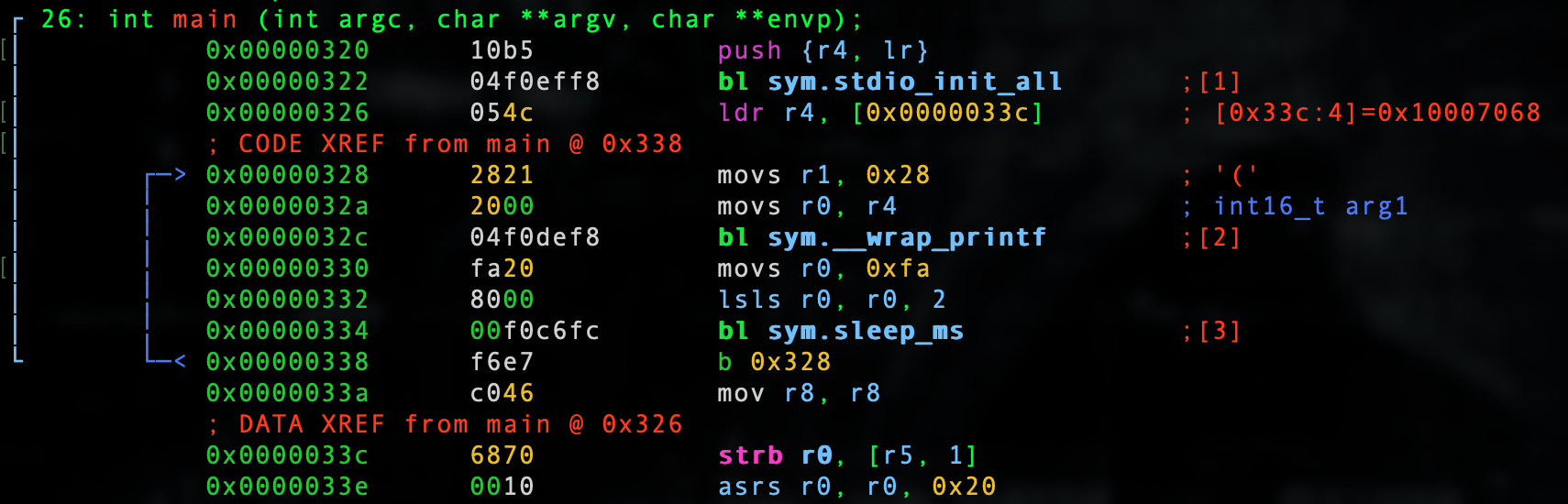
We start out by setting up our main return value.
push {r4, lr}
We call the standard I/O init.
bl sym.stdio_init_all
We then load our format modifier %d into r4.
ldr r4, [0x0000033c]
We can prove it.
:> psz @ [0x0000033c]
%d
We then load our int '40' into r1 _which is _0x28 hex.
movs r1, 0x28
We can prove it.
:> ? 0x28
int32   40
uint32  40
hex     0x28
octal   050
unit    40
segment 0000:0028
string  "("
fvalue: 40.0
float:  0.000000f
double: 0.000000
binary  0b00101000
ternary 0t1111
We then move our format modifier into r0.
movs r0, r4
We then branch long to the printf wrapper and call it.
bl sym.__wrap_printf
We then move 250 decimal or 0xfa hex into r0.
movs r0, 0xfa
We then move 250 decimal, which we know when logical shift left twice will be 1,000 decimal or 0xfa hex into r0.
lsls r0, r0, 2
We then call the sleep_ms function.
bl sym.sleep_ms
We then continue the while loop infinitely.
b 0x328
In our next lesson we will hack this very simple binary.